


From our experience, a good website conversion rate sits between 2% and 5%. But that number alone tells you almost nothing.
A 2% rate for a luxury watch brand pulling in $8,000 per sale, for example, can be outstanding. That same 2% for a $10 phone case store? Not so much. Your industry, traffic source, and the action you’re asking visitors to take all change what “good” looks like for your site.
If you’ve been searching “what is a good website conversion rate” and keep getting the same vague answer, that’s why. There’s no single number that fits every business. So before you benchmark yourself against a global average, you need to understand what your number means first.
That’s what this article covers, along with how benchmarks vary by industry and where your site likely stands right now.
Let’s dive in.
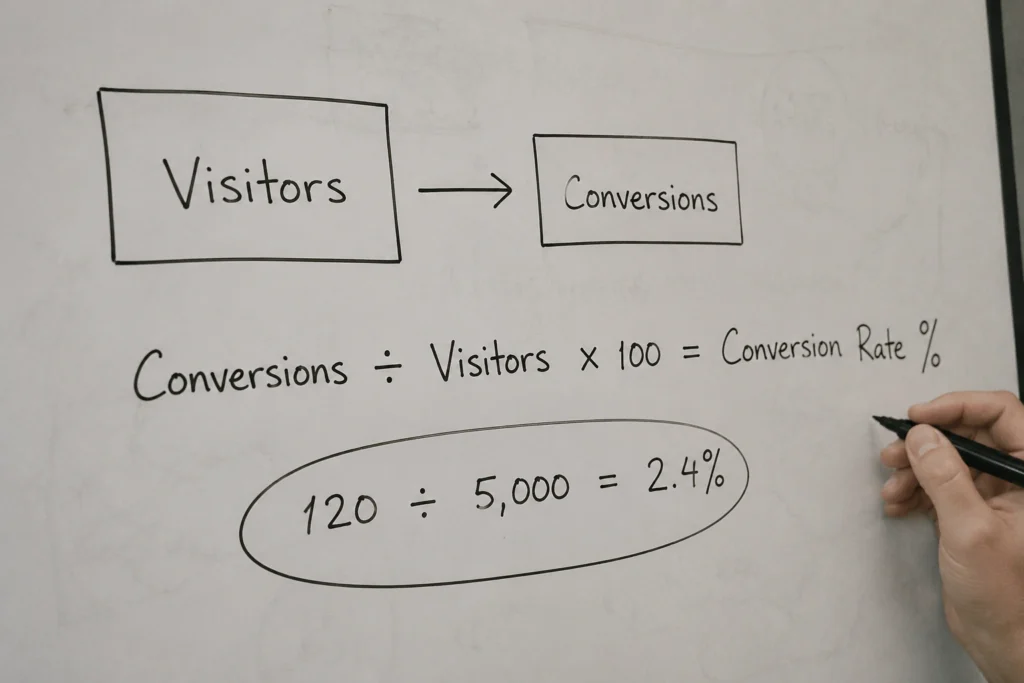
A website conversion rate is the percentage of visitors who complete a desired action on your site. That action could be making a purchase, submitting a form, calling your business, or signing up for a newsletter. It all depends on what goal you’ve set for your site.
To calculate it, divide the number of completed actions by your total visitors and multiply by 100:
Conversion Rate = (Conversions ÷ Total Visitors) × 100
So if your site receives 5,000 visitors and 120 of them complete that goal, your conversion rate is 2.4%. That number tells you far more about website performance than traffic volume alone. A site attracting 500 visitors and generating 25 conversions is more effective than one bringing in 5,000 visitors but converting only 30.

As we mentioned in the introduction, a good website conversion rate for most businesses falls between 2% and 5%. That’s a useful benchmark, but it’s only a starting point. To know whether your number is a problem or not, think in three ranges.
A rate below 2% usually points to one of these three things:
But a low rate isn’t necessarily bad. A 1% conversion rate for an e-commerce store selling $15 products is a problem. For a law firm billing $10,000 per client, that same 1% could mean a very healthy pipeline. Your rate only tells part of the story. The real context comes from how much each conversion is worth to your business.
Landing in this range generally means your site is performing well. Your traffic is reasonably well targeted, your offer is clear, and visitors aren’t running into major obstacles before taking action. Most local service businesses, trades, and professional firms fall into this range when their SEO and user experience are in good shape.
If you’re here, there’s no reason to panic. A 2–5% conversion rate is considered healthy for most businesses. That said, healthy doesn’t mean perfect, and there’s usually still room to improve.
Above 5%, your traffic is usually well targeted, your messaging is clear, and your page is effectively doing its job. At this level, most websites have already tested and refined what works, which removes friction points that stop visitors from converting.
Once you move past 10%, you’re in rare territory. These numbers typically come from highly focused landing pages built for a very specific audience, with a single goal and minimal distractions.
When everything aligns (intent, offer, and simplicity), conversion rates can climb into this range.
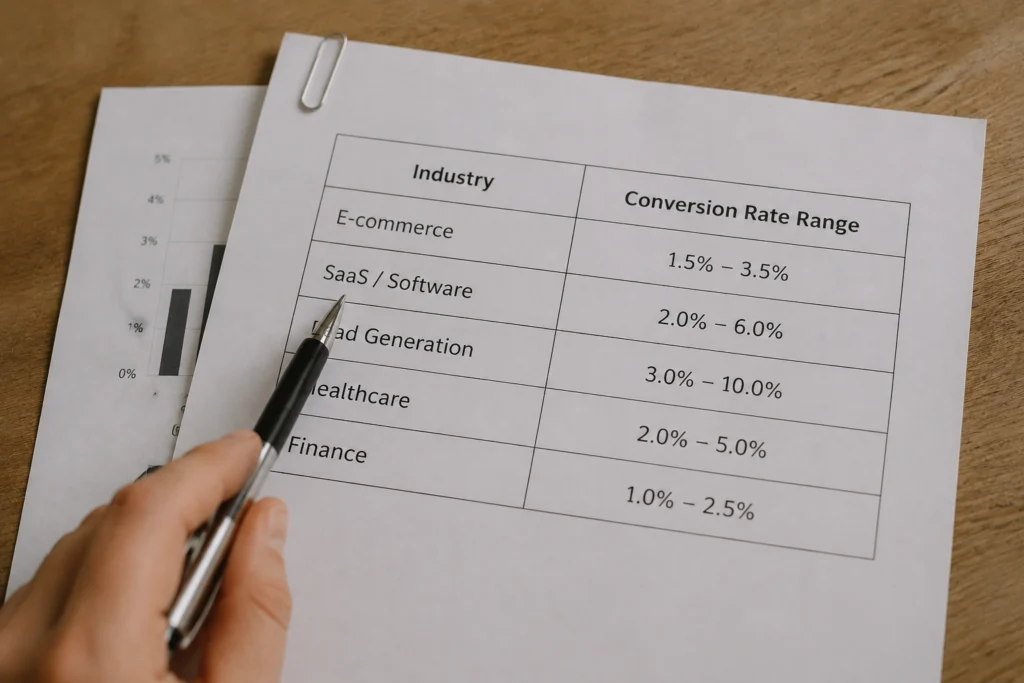
Your rate only means something when you compare it to businesses like yours. Here’s how conversion rates break down across some of the most common industries:
| Industry | Typical Conversion Rate | Why |
| E-commerce | 1% to 3% | Most visitors are browsing, not buying. Price point and product type shift this significantly. |
| SaaS / Software | 3% to 7% | Free trials and freemium models lower the barrier to saying yes. |
| B2B / Lead Generation | 2% to 5% | Longer sales cycles, but motivated visitors who already know what they want. |
| Professional Services | 3% to 6% | Trust-driven decisions. Strong social proof converts well. |
| Finance / Healthcare | 2% to 4% | High-consideration categories. Visitors take more time before committing. |
Don’t see your industry listed? Use the category that most closely matches your primary conversion goal. A bookkeeping service, for example, would benchmark closer to professional services than retail.
If your conversion rate sits below your industry benchmark, the cause is rarely a single major issue. More often, it’s a handful of small friction points that make it harder for visitors to take action. These are the five most common ones.
When we audit underperforming websites, at least 2 or 3 of these issues are almost always present at the same time. If you recognise any of them on your own site, don’t try to fix everything at once. Start with the most obvious issue, improve it, and then move through the rest step by step.

Now that you’ve got the benchmarks, placing yourself on the map takes three steps.
Start by finding your current conversion rate. In GA4 (Google Analytics 4), go to Reports → Conversions and compare your conversion events against total users. Most e-commerce platforms like Shopify also display this directly in your dashboard.
Next, compare your number against your industry range from the table above, rather than the general 2% to 5% benchmark. Your category gives you a much more accurate reference point.
Finally, look at your traffic source. A low conversion rate from paid search is usually more urgent than the same rate from organic or social traffic. That’s because paid visitors cost you money and are already further along in their decision-making.
You’re no longer guessing at this point. You can see exactly where the gap is, which makes it far easier to identify what needs to change to increase the website conversion rate.
Most conversion problems are design problems in disguise. Issues like slow load speeds, weak CTAs, a poor mobile experience, and missing trust signals all trace back to how your team built the site. They also show up in how it feels to use.
When your design is clear, fast, and built around what your visitor needs to see and feel, conversions follow. Otherwise, even great traffic and strong offers go to waste.
If your rate’s below where it should be and you’re not sure where to start, DevelopersDex can help. We build websites designed around conversion.
Reach out, and we’ll take a look and tell you exactly where the gaps are.
Once you start digging into your conversion rate, a few common questions usually come up. These are the ones we hear most often.
Yes. Different pages serve different purposes, so tracking the same goal across your entire site can give you a distorted view of performance. For example, your homepage might focus on clicks to key service pages, while a services page should track form submissions or calls.
Setting page-level conversion goals gives you a clearer understanding of what’s working and where visitors are dropping off.
Not automatically. Your conversion rate is a percentage, so sending more traffic to a page that isn’t converting won’t move the needle. In fact, broad or untargeted traffic can actually lower your rate by bringing in visitors who were never going to convert in the first place. More traffic helps when it’s the right traffic.
Once a month is a reasonable cadence for most small businesses. Checking too frequently can lead to reactive decisions based on short-term fluctuations that don’t reflect a real trend. If you’ve recently made changes to your site or launched a new campaign, check weekly until the data stabilises.
A macro conversion is your primary goal, such as a purchase, a form submission, or a phone call. A micro conversion, by contrast, is a smaller action that signals progress toward your main goal. This could include clicking your pricing page or signing up for your email list. Tracking both gives you a fuller picture of how visitors move through your site before they convert.
Sometimes, yes. A very high conversion rate on low traffic volume can mean your audience is too narrow, mostly returning visitors or warm referrals, rather than new potential customers. It’s worth checking your traffic sources alongside your conversion rate to make sure you’re growing the right audience, not just converting a small one.
Company Reviews